Equipment gallery


Why clubs pick PadelScore
Clarity on court, reliable offline operation and quick setup.
No Internet needed
Works fully offline with a robust wireless link.
2 speakers • PT/EN/ES
Loud announcements for points, advantage/deuce and service.
Last point blinks
Instantly see who scored. Big digits and server indicator.
Power options
Panel via powerbank or 5V USB‑C adapter; wrist remote ~20 matches per charge.
Paired sets, no interference
Each wrist remote is paired with its panel, so multiple sets can operate side‑by‑side without cross‑talk.
On‑screen info
Shows temperature, current time and match duration.
Intuitive control
4‑button wrist remote, undo last point and quick server swap.
How to use
Power on
Connect the panel to a powerbank or a 5V USB‑C adapter.
Start the match
Choose the server and press the team color on the remote.
Score points
Press after each rally. The last point blinks; the voice announces the score.
Optional: update clock
Create Wi‑Fi PADELSCORE with password 1a2b3c4d5e, power the panel and wait for sync.
Remote (4 buttons)
- Easy choice of server and quick swap
- Undo the last point
Game modes
- Advantage or Golden Point
- Standard scoring (15–30–40) with announcements in PT/EN/ES
- Tie‑break & Super tie‑break with automatic service rotation
- Tournament mode: 1–90 minute timer with buzzer at the end
- Easy choice of server
- Swap server anytime
- Undo the last point
- Reconfiguration available through the remote
Power & Clock
Panel
Use a powerbank (USB‑C) or a 5V USB‑C wall adapter. Works fully offline — no Internet needed.
Wrist remote
Around 20 matches per charge. USB‑C charging.
Update the clock (optional)
- Create a Wi‑Fi network with SSID PADELSCORE and password 1a2b3c4d5e.
- Turn the panel on near that network.
- Wait a few seconds for automatic synchronization.
Contact
Tell us about your club or event and we’ll get back to you.
FAQ
Does it need Internet?
No. It operates fully offline, with a robust wireless link between the remote and the panel.
How far does the remote reach?
It is designed for elevated range suitable for padel courts and club environments.
Do the wrist remotes interfere with each other?
No. Each wrist remote is paired to its own panel, so multiple sets can operate in the same venue without interference.
How do I power it?
Panel: powerbank (USB‑C) or 5V USB‑C adapter. Wrist remote: ~20 matches per charge, USB‑C.
How do I update the time?
Create a Wi‑Fi network with SSID PADELSCORE and password 1a2b3c4d5e, power the panel and wait for sync.
Quick Guide
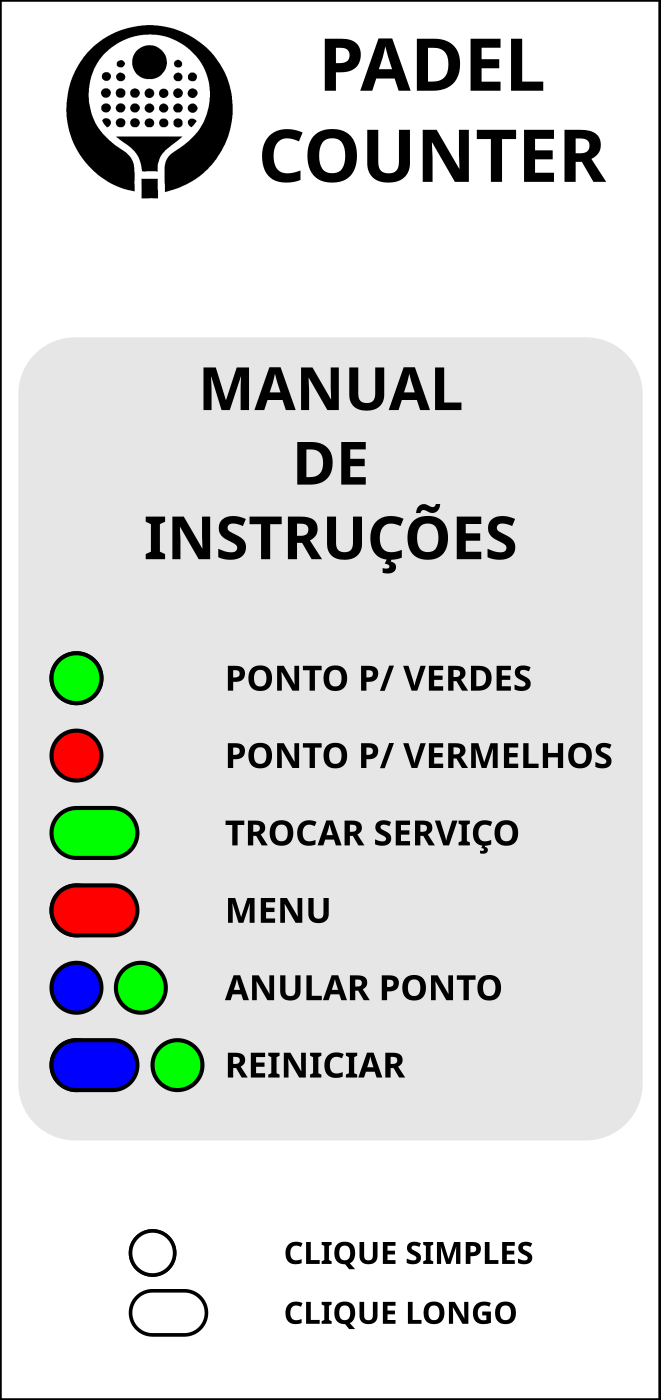
- Power the panel (USB‑C). Choose server with the remote.
- Press team color for each point. Undo with the black button.
- Modes: Advantage/Golden Point • Tie‑break/Super tie‑break • Tournament 1–90 min.
- Clock sync (optional): SSID PADELSCORE / password 1a2b3c4d5e.